
I’ve recently been introduced Temporal Tables which is a new feature of SQL Server 2016. After studying this new feature, I have to say this is probably one of the features I’m the most excited about. I’m hoping to use this as a replacement to current auditing and versioning techniques that require triggers or extra columns.
Here is a simple script that will create a table.
CREATE TABLE dbo.Employee
(
  EmployeeID int IDENTITY(1,1) NOT NULL PRIMARY KEY CLUSTERED
  , Name nvarchar(100) NOT NULL
  , Position varchar(100) NOT NULL
  , HealthPlan varchar(25) NOT NULL
  , UpdatedBy varchar(25) NOT NULL
		    CONSTRAINT DF_Employee_UpdatedBy DEFAULT(SUSER_NAME())
  , ValidFrom datetime2(2) GENERATED ALWAYS AS ROW START HIDDEN
  , ValidTo datetime2 (2) GENERATED ALWAYS AS ROW END HIDDEN
  , PERIOD FOR SYSTEM_TIME (ValidFrom, ValidTo)
 )
 WITH (SYSTEM_VERSIONING = ON (HISTORY_TABLE = dbo.EmployeeHistory));
Since the validFrom and validTo days are flagged as Hidden, they do appear when we query using Select * from the table. They will return however, if we specify them specifically.
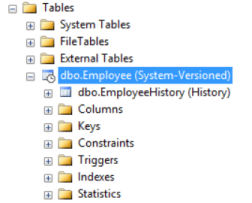
The script creates 2 tables. Also, notice how the Employee table has a different icon than a regular table.
You can’t truncate a history table or run any updates or deletes against the history table while the source table still has versioning enabled. To make these kind of changes, first alter the table, make the changes, and then enabling versioning again.
 /* Sets versioning off */
ALTER TABLE dbo.Employee SET ( SYSTEM_VERSIONING = OFF)
/* Make changes to the EmployeeHistory table */

 /* Sets versioning back on */
ALTER TABLE dbo.Employee SET ( SYSTEM_VERSIONING = ON)
Another nice feature is that whenever you add a column to the source table, this column automatically gets added to the history table. This was a pain point previously where any new columns also potentially had to get added to additional audit tables and triggers manually. This left a lot of room for forgetting and auditing against the new column being missed.

 docker - elastic - dotnet - sql